
Quick Estimate, Indicator Panel & Bookmarks
A guide to the additional tools on the V-Hive listing card — Quick Estimate, market indicators and Bookmarks — for faster browsing research.
This guide explains the additional tools available directly on the V-Hive listing card. These features are designed to provide useful market context while browsing and help you identify listings that may be worth researching in more detail.
Unlike Deep Search, these tools are intended to provide a fast overview without performing a comprehensive search across multiple pages of active Vinted listings.
Quick Estimate & Indicator Panel
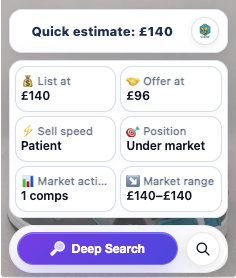
The listing card displays a number of market indicators designed to help you assess a listing at a glance.
Quick Estimate
Quick Estimate provides an instant estimated listing value while you browse.
Unlike Deep Search, Quick Estimate does not perform a comprehensive search across multiple pages of Vinted. Instead, it analyses comparable listings already available on the current page to generate a fast estimate.
Quick Estimate is designed as an initial indicator, helping you decide whether a listing is worth investigating further using Deep Search.
List At
List At provides an estimated listing price based on the comparable active listings analysed by V-Hive.
This should be viewed as a guide only and not a recommended selling price.
Offer At
Offer At provides an estimated purchase price that may leave room for resale, based on the current market information available.
This is intended as guidance only and should always be considered alongside your own research, experience and buying strategy.
Sell Speed
Sell Speed provides a general indication of how quickly similar items appear to move within the current market.
Possible values include:
- Fast
- Medium
- Patient
Sell Speed should be interpreted as a general market indicator rather than a guaranteed selling timeframe.
Position
Position compares the current listing price with similar active listings, providing a simple indication of where the listing sits within the current market.
Market Activity
Market Activity indicates how many comparable listings were identified during the analysis. This helps provide additional context when assessing the reliability of the available market information.
Market Range
Market Range displays the approximate range of asking prices found across comparable active Vinted listings. This can help you understand where the current listing sits within the wider market.
Bookmarks
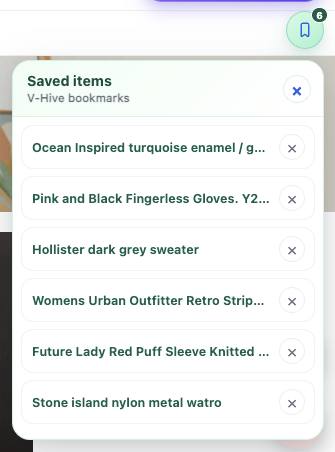
Bookmarks allow you to save interesting Vinted listings while browsing.
Saved listings can be reviewed at any time from the Bookmarks panel, making it easy to compare multiple items before making a buying decision.
Bookmarks are stored locally within the extension and can be removed individually at any time.
Important Information
As with all V-Hive features:
- Results are based on active Vinted listings
- Confirmed sold prices are not included
- Buyer Protection fees are not included
- Shipping costs are not included
- The information provided should always be used alongside your own research and judgement
Continue Learning
You may also find these guides useful:
- Getting Started with V-Hive
- Deep Search
- Manual Deep Search
- Manual Search
Install V-Hive
Install the latest version of V-Hive from the Chrome Web Store and begin analysing Vinted listings in seconds.
Add V-Hive to ChromeRelated articles
Deep Search
Learn how Deep Search works, what the results mean and how to use them to make more informed buying and pricing decisions on Vinted.
Read article V-Hive GuidesManual Deep Search
Research any item on Vinted without opening a listing — enter your own search terms and get a full market summary using Deep Search technology.
Read article V-Hive GuidesManual Search
Search any Vinted listing across eBay, Depop, Facebook Marketplace and more with a single click — no copying and pasting required.
Read article