
Manual Deep Search
Research any item on Vinted without opening a listing — enter your own search terms and get a full market summary using Deep Search technology.
Manual Deep Search allows you to perform a comprehensive Vinted market search without opening an existing listing.
Instead of analysing the listing you're currently viewing, Manual Deep Search lets you enter your own search terms and searches active Vinted listings using the information you provide.
This makes it particularly useful when researching products before sourcing them, comparing different items or investigating the current market for a specific product.
Running a Manual Deep Search
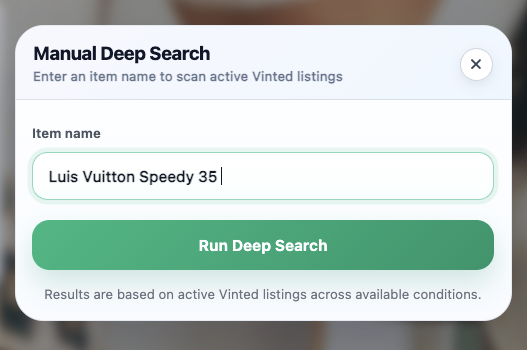
Open Manual Deep Search from the V-Hive menu.
Enter a description of the item you would like to research.
For the best results, include as much relevant information as possible, for example:
- Brand
- Product name
- Model
- Colour
- Size
- Material (if relevant)
For example: Ralph Lauren Quarter Zip, Red, Extra Large
Adding more specific information usually produces more relevant comparable listings.
Once you've entered your search, click Run Deep Search. V-Hive will analyse active Vinted listings matching your search terms and generate a market summary.
Understanding the Results
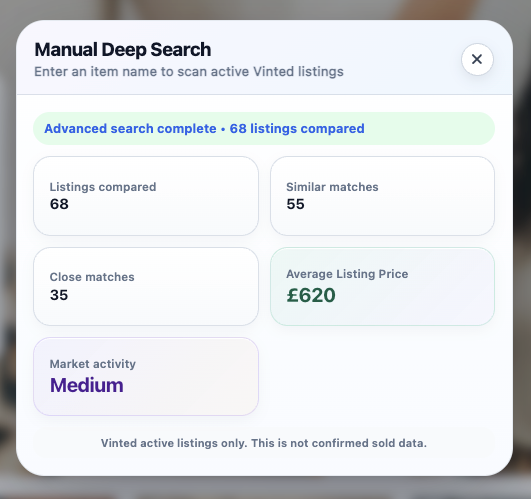
The results are similar to the standard Deep Search feature, but are generated using your manual search rather than an existing Vinted listing.
Listings Compared
Shows the total number of active Vinted listings analysed during the search.
A higher number of comparable listings generally provides a broader picture of the current market.
Similar Matches
These are listings that share similar characteristics with the search you entered.
They help provide additional market context and contribute towards the overall pricing information.
Close Matches
Close Matches are listings that more closely match your search terms.
These are generally the most useful listings when assessing current asking prices for a particular item.
Average Listing Price
Average Listing Price represents the average asking price across the comparable active Vinted listings identified during the search.
This figure is based on active listings only and should not be interpreted as a confirmed selling price.
Market Activity
Market Activity provides a simple indication of how many comparable listings are currently available for the search performed.
Depending on the number and relevance of matching listings, activity may be displayed as:
- Low
- Medium
- High
This should be used as a general market indicator rather than a measure of demand or future sales.
When Should You Use Manual Deep Search?
Manual Deep Search is particularly useful when:
- Researching an item before purchasing it
- Comparing different products or brands
- Checking the current market for a specific model
- Investigating products without opening an existing Vinted listing
- Carrying out broader market research before sourcing inventory
If you're already viewing a Vinted listing, the standard Deep Search feature is usually the quickest option.
Important Information
The results do not include:
- Confirmed sold prices
- Buyer Protection fees
- Shipping costs
- Negotiated offers
- Final transaction prices
- Future market demand
- Seasonal trends
The information provided is intended to support your own research and should always be considered alongside your own knowledge and judgement.
Best Practice
The quality of the results depends on the search terms you enter.
For the most accurate market analysis:
- Use the full product name whenever possible
- Include the brand
- Include colours where relevant
- Include the size if it is important to pricing
- Avoid overly broad searches unless you're researching a whole product category
More specific searches generally produce more relevant comparable listings.
Continue Learning
You may also find these guides useful:
- Getting Started with V-Hive
- Deep Search
- Manual Search
- Quick Estimate & Indicator Panel
Install V-Hive
Install the latest version of V-Hive from the Chrome Web Store and begin analysing Vinted listings in seconds.
Add V-Hive to ChromeRelated articles
Deep Search
Learn how Deep Search works, what the results mean and how to use them to make more informed buying and pricing decisions on Vinted.
Read article Getting StartedGetting Started with V-Hive
A complete walkthrough of every V-Hive feature — from Deep Search and Quick Estimate to Manual Search, Bookmarks and the Indicator Panel.
Read article