
Getting Started with V-Hive
A complete walkthrough of every V-Hive feature — from Deep Search and Quick Estimate to Manual Search, Bookmarks and the Indicator Panel.
Watch V-Hive in Action
Watch this complete walkthrough to see how V-Hive works while browsing Vinted.
Welcome
V-Hive is a research tool built for Vinted resellers. It helps you analyse active Vinted listings, compare similar items, estimate current market pricing and research products more efficiently without leaving the marketplace.
Instead of manually opening dozens of listings to compare prices, V-Hive provides additional market information directly alongside the items you browse. Each feature is designed to speed up research while helping you make more informed sourcing decisions.
This guide provides a brief overview of every major feature available in V-Hive. Each feature also has its own dedicated guide containing more detailed explanations, examples and best practices.
V-Hive Overview
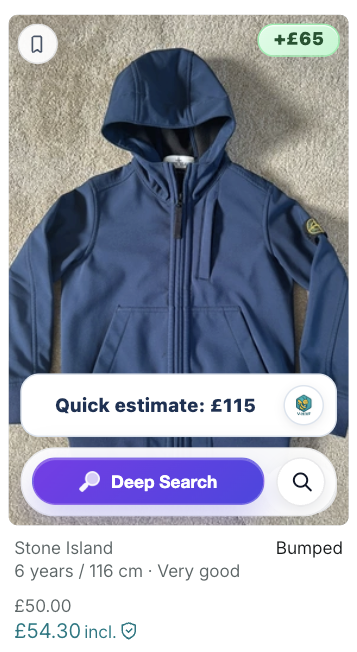
The listing card is the main interface for V-Hive while browsing Vinted. It provides quick access to the extension's core research tools and market indicators, allowing you to begin researching a listing directly from the search results page.
The listing card allows you to:
- View an instant Quick Estimate
- Launch a full Deep Search
- Open Manual Search across other marketplaces
- Save listings to Bookmarks
- View market indicators while browsing
Quick Estimate provides an immediate overview of a listing, while Deep Search performs a more comprehensive analysis across active Vinted listings when more detailed market research is required.
Deep Search
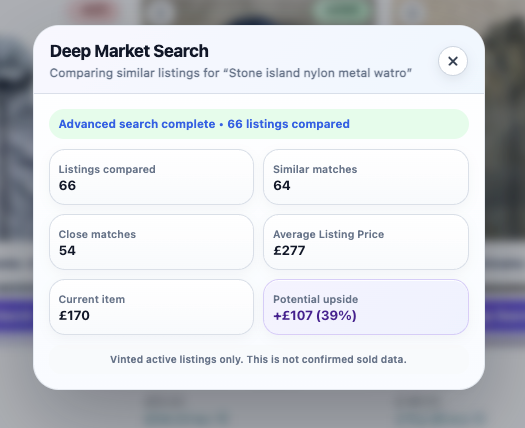
Deep Search is V-Hive's primary research tool.
When launched, V-Hive performs a comprehensive search across multiple pages of active Vinted listings to find comparable items and summarise the current market.
The results include:
- Listings Compared
- Similar Matches
- Close Matches
- Average Listing Price
- Current Item Price
- Potential Upside
Together, these help you understand how the current listing compares with the wider Vinted marketplace.
All results are based on active Vinted listings and are intended to support your own research rather than provide guaranteed valuations.
Continue to the Deep Search Guide for a detailed explanation of every metric.
Manual Deep Search
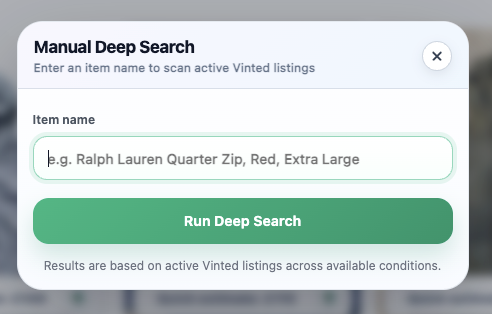
Manual Deep Search allows you to perform the same comprehensive Vinted search without opening a listing first.
Simply enter your own search terms, such as:
- Brand
- Product name
- Colour
- Size
- Model
This is particularly useful when researching products before sourcing them or investigating specific items in advance.
Continue to the Manual Deep Search Guide for a complete walkthrough.
Manual Search
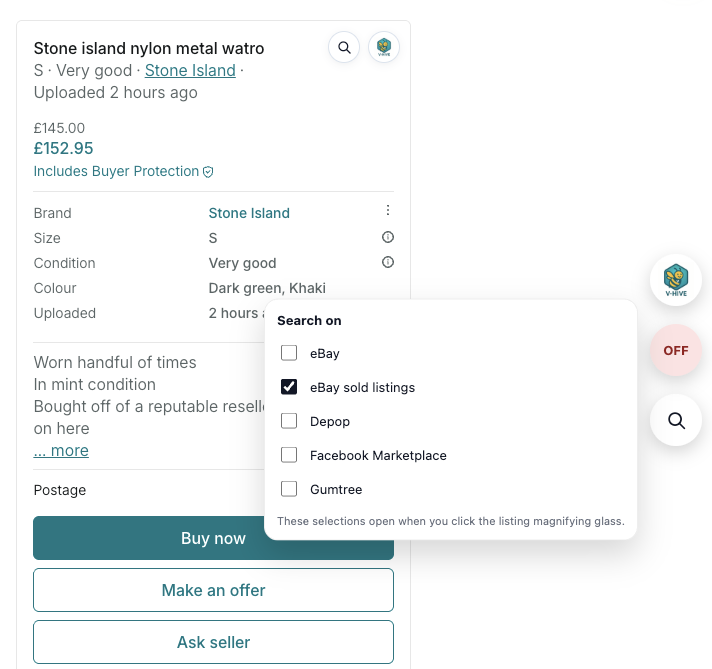
Manual Search helps you continue your research beyond Vinted.
Choose the marketplaces you'd like to search, then launch them with a single click.
Manual Search does not analyse those marketplaces or import pricing data.
Instead, it simply saves time by opening relevant searches automatically, allowing you to carry out your own wider market research.
Continue to the Manual Search Guide for more information.
Quick Estimate
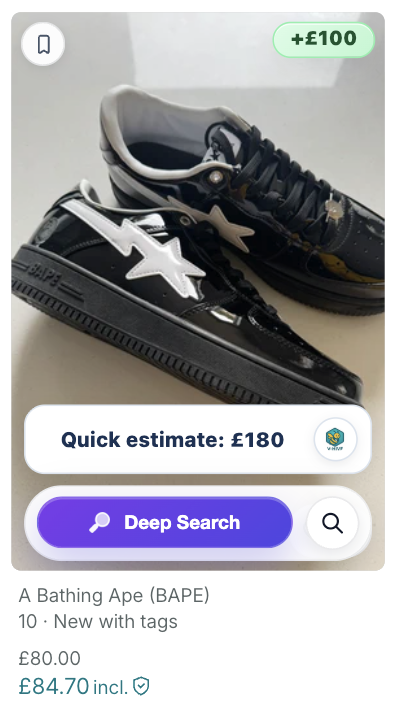
Quick Estimate provides an instant overview while you're browsing Vinted.
Unlike Deep Search, it does not perform a full search across multiple pages of listings.
Instead, it compares the current listing with similar items already visible on the page to generate a fast estimate.
Think of Quick Estimate as an early indicator. If an item looks interesting, you can then launch Deep Search for a much more detailed market analysis.
Indicator Panel
The indicator panel provides additional information designed to help you assess a listing at a glance.
Depending on the available data, this may include:
- Estimated listing value
- Offer suggestion
- Sell speed
- Market activity
- Market range
These indicators are intended to provide additional context while browsing and should always be considered alongside your own research.
Bookmarks
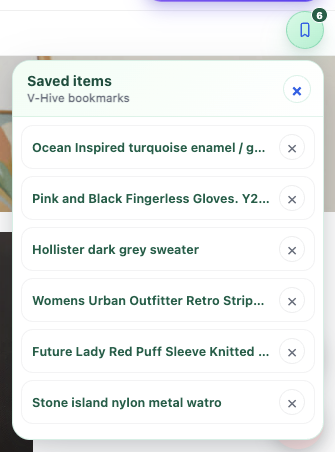
Bookmarks allow you to save interesting listings while browsing.
Instead of opening multiple tabs or trying to remember items you've seen, simply bookmark them and return later to compare potential purchases.
Bookmarks are ideal for shortlisting items before making a final buying decision.
Next Steps
Now that you're familiar with the main features of V-Hive, you can explore each tool in more detail through the dedicated guides.
- Deep Search Guide
- Manual Deep Search Guide
- Manual Search Guide
- Quick Estimate & Indicator Panel Guide
Or continue exploring our growing collection of Vinted reseller articles.
Install V-Hive
Install the latest version of V-Hive from the Chrome Web Store and begin analysing Vinted listings in seconds.
Add V-Hive to Chrome