
Deep Search
Learn how Deep Search works, what the results mean and how to use them to make more informed buying and pricing decisions on Vinted.
Deep Search is V-Hive's primary market research tool. It analyses the listing you are currently viewing and searches active Vinted listings to provide additional market context before you buy or price an item.
Unlike Quick Estimate, which provides a fast indication using comparable listings visible on the current page, Deep Search performs a much more comprehensive search across multiple pages of active Vinted listings to build a broader picture of the current market.
The results are intended to support your own research and should always be considered alongside your own knowledge and judgement.
Running a Deep Search

Simply click the Deep Search button on any supported Vinted listing.
V-Hive will analyse the listing and compare it with active Vinted listings that share similar characteristics, including details such as the brand, product type, keywords and other relevant information.
Once complete, the Deep Search results window will appear.
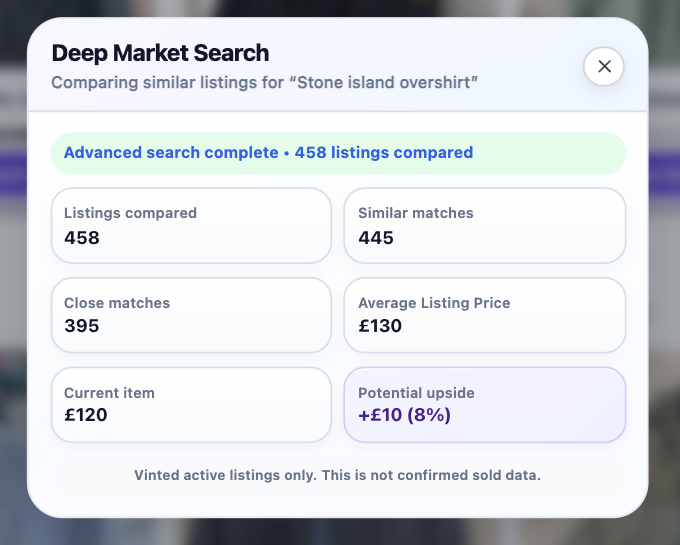
Understanding the Results
Listings Compared
This shows the total number of active Vinted listings that were analysed during the search.
Generally, a larger number of listings provides a broader view of the current market.
Similar Matches
Similar Matches are listings that share similar characteristics with the item being researched.
These help build a wider picture of current market pricing and availability.
Close Matches
Close Matches are listings that more closely resemble the item being researched.
These typically share more matching characteristics and are generally the most useful listings when assessing current market pricing.
Average Listing Price
Average Listing Price represents the average asking price of the comparable active listings identified during the search.
This figure is based on current listing prices only.
It is not an average sold price and should not be interpreted as the amount an item will necessarily sell for.
Current Item
This is the current asking price of the Vinted listing you are viewing.
It provides the reference point used when calculating Potential Upside.
Potential Upside
Potential Upside compares the current listing price with the Average Listing Price calculated from comparable active listings.
A positive percentage or value indicates that the current listing is priced below the calculated average.
A negative value indicates that the listing is currently priced above the calculated average.
Potential Upside should always be treated as an indication rather than a recommendation.
Important Information
The results do not include:
- Confirmed sold prices
- Buyer Protection fees
- Shipping costs
- Negotiated offers
- Final transaction prices
- Item condition beyond the information available in the listing
- Seasonal demand or future market changes
Because of this, the Average Listing Price and Potential Upside should be viewed as research tools rather than guaranteed valuations.
Best Practice
Deep Search is most effective when used as part of a wider research process.
Before making a buying or pricing decision, consider:
- The item's condition
- Listing photographs
- Brand popularity
- Colour and size
- Seasonal demand
- The number of comparable listings available
- Your own knowledge and experience
The strongest buying decisions are made by combining V-Hive's market analysis with your own judgement.
Continue Learning
Now that you understand how Deep Search works, you may also find these guides useful:
- Manual Deep Search
- Manual Search
- Quick Estimate & Indicator Panel
- Getting Started with V-Hive
Install V-Hive
Install the latest version of V-Hive from the Chrome Web Store and begin analysing Vinted listings in seconds.
Add V-Hive to Chrome