
Manual Search
Search any Vinted listing across eBay, Depop, Facebook Marketplace and more with a single click — no copying and pasting required.
Manual Search allows you to continue researching a Vinted listing across multiple marketplaces and search engines with a single click.
Rather than manually copying listing titles into different websites, Manual Search automatically opens searches using the item you're currently viewing, helping you compare listings and continue your own research more efficiently.
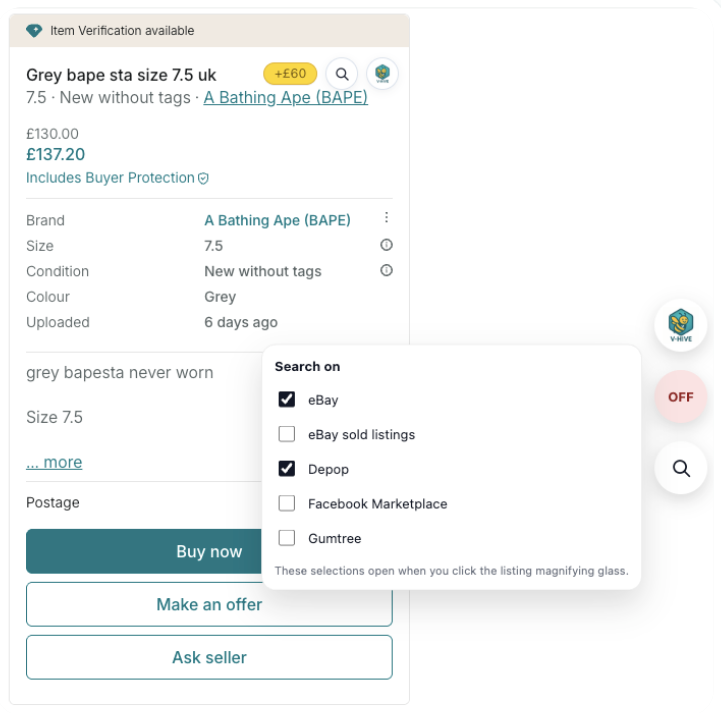
How Manual Search Works
When viewing a supported Vinted listing, click the magnifying glass icon.
A list of available marketplaces will appear.
Select the marketplaces you would like to search, then click the listing search icon to launch those searches automatically.
You can choose one marketplace or multiple marketplaces at the same time.
Supported Marketplaces
Depending on your settings, Manual Search can launch searches on:
- eBay
- eBay Sold Listings
- Depop
- Facebook Marketplace
- Gumtree
Additional marketplaces may be added in future updates.
eBay vs eBay Sold Listings
Manual Search provides two different eBay search options.
eBay searches active listings that are currently available for sale. This is useful when comparing asking prices across different marketplaces.
eBay Sold Listings searches completed listings that have successfully sold. Where available, sold listings can provide additional context about historical selling prices.
Choosing Multiple Marketplaces
You are not limited to a single marketplace. You can select multiple marketplaces at the same time — for example, eBay, eBay Sold Listings and Depop simultaneously.
V-Hive will open each selected search automatically, allowing you to compare results without repeatedly entering the same search terms.
Important Information
All pricing comparisons, sold listings and marketplace research remain your own responsibility.
Best Practice
Manual Search is most useful when used alongside Deep Search. A typical workflow might be:
- Run a Deep Search to understand the current Vinted market
- Open Manual Search to compare the same item across other marketplaces
- Review active listings and sold listings where available
- Combine this information with your own knowledge before making a buying or pricing decision
Continue Learning
You may also find these guides useful:
- Getting Started with V-Hive
- Deep Search
- Manual Deep Search
- Quick Estimate & Indicator Panel
Install V-Hive
Install the latest version of V-Hive from the Chrome Web Store and begin analysing Vinted listings in seconds.
Add V-Hive to ChromeRelated articles
Deep Search
Learn how Deep Search works, what the results mean and how to use them to make more informed buying and pricing decisions on Vinted.
Read article V-Hive GuidesManual Deep Search
Research any item on Vinted without opening a listing — enter your own search terms and get a full market summary using Deep Search technology.
Read article Getting StartedGetting Started with V-Hive
A complete walkthrough of every V-Hive feature — from Deep Search and Quick Estimate to Manual Search, Bookmarks and the Indicator Panel.
Read article